Some really cool videos to learn AI and Reinforcement Learning.
Check out.
https://www.youtube.com/channel/UCTmAYxRV7H9NTdgC9bNixvw
Check out.
https://www.youtube.com/channel/UCTmAYxRV7H9NTdgC9bNixvw
1.
sudo apt-get install liblapack-dev
This
ensures that your lapack/blas dependencies are taken care of which is
required by scipy2.
sudo apt-get install libamd2.2.0 libblas3gf libc6 libgcc1 libgfortran3 liblapack3gf libumfpack5.4.0 libstdc++6 build-essential gfortran python-all-dev libatlas-base-devThis
would ensure that you now have a fortran compiler on your system for
the dfftpack in scipy3.
sudo pip install ziplineThis
will finally install zipline along with all its dependenciesHave
a go at it.


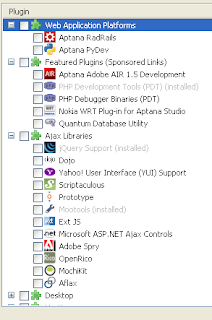
I initially could not get Autocomplete support for Jquery after installing the add on. A little bit of digging in got it working. To enable it go to
Window->Preferences->Aptana(Right column)->Editors->Javascript->CodeAssist
You will see check boxes against all the JS libraries you have installed support for. By default they will be unselected. Check them and you are ready to GO!

![Reblog this post [with Zemanta]](https://lh3.googleusercontent.com/blogger_img_proxy/AEn0k_sJwFWGP2sXD5scv6Caq4nPfThSHhynJgwbdcF_uP3SndTE1fEpyDuWAL3OA7FRiL9xmI7UnrxjPrD3THenehrmHoKiyUNDFK6Crnq5gBpTPO6zIQIFjAvOdC-sGSX2ms2w10CzJEfg-ji2eexVt8KW=s0-d)

The first reaction would be ..which is the first best thing? AjAX of course.
The beauty of jQuery lies in its simplicity and small footprint. Javascript indeed should have been the jQuery way right from start. There will be countless developers who must have been waiting in the shed to jump onto javascript but only for the complexities of handling the DOM through JS ( gees. I dont like the word). jQuery beautifully abstracts this complexity of DOM through extremely useful functions and a CSS style compatible syntax. CSS compataibility means developers who know even a bit of CSS would have no probs adopting this framework!
Its been a week now that i have been playing around with it and can praise this to no end. I would suggest you have a look too.
And some starting guide.


I do not support IE in this because i could not get this method to work with IE. You could try and tell me if it worked for your case.


 Cool now ! If you see a command prompt, you have been able to log into the machine! Give yourself a pat on the back. If not put down your problem below and i will be happy to help you out.
 Click on the setting tab after you have reached to the settings window of Firefox above from Tools->Options.
 Scroll down to network.proxy_socks_remote_dns setting and set it to true.


For further info u could visit my blog dedicated to Micromouse- micromouse.blogspot.com


